Spine Animation
Spine software allows to create complex 2D animations and effects. At the same time, complex unoptimized 2D animations might become a bottleneck for the performance of the game. This section contains the best practices, recommendations and limitations for the Art team to create optimized Spine animations.
Following best practices and recommendations will help to avoid potential issues and improve player experience.
Spine editor contains Metrics panel. This panel allows to see the amount of bones, slots, meshes and other metrics for the current skeleton/animation. Metrics helps to understand if animation is too complex and what could be optimized.
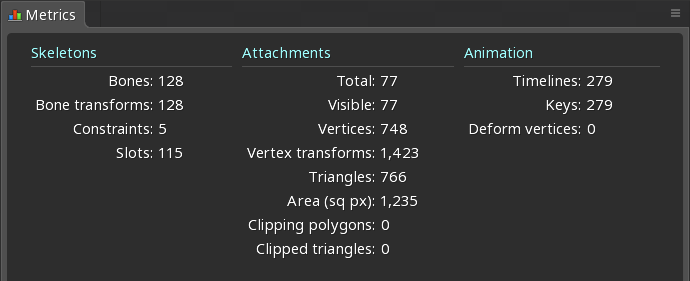
Here are the main reasons of limitations. Each point is twice important for mobile devices:
-
MEMORY: Web browser usually limits amount of memory, that can be consumed by a single tab. Having too many high-resolution textures, or too heavy animations loaded at the same time might lead to huge memory consumption, which leads to the browser tab crash and will make the game unplayable.
-
GPU usage: Rendering pipeline is highly dependent on amount of
draw callsdone on each frame. The game scene contains a lot of elements, that need to be drawn on the screen. Having too complex animations might lead to a high amount ofdraw calls, which often leads to performance issues. -
CPU usage: Updating and rendering all animations on the game scene might be a heavy operation. Having too many bones, slots and complex meshes for each animation often leads to performance issues. Web browser might also crash a tab, if decides that JavaScript updates scene for too long.
📄️ Common Requirements
All animations should be made in Spine version either 4.2.xx or 3.8.99.
📄️ Background Limitations
Background animations are often delivered with a huge amount of details, complex meshes and large textures. Even though background elements are typically covered by reels and other UI elements, optimizing this part of the scene could be a headache.
📄️ Blending Mode Limitations
Blending mode increases amount of draw calls, required to render the animation. Each time a different blend mode is used, a new draw call is required. It's important to use blend modes wisely to avoid performance issues.
📄️ Masks Limitations
Mask increases amount of draw calls, required to render the animation. Complex polygonal mask requires several draw calls to render and allocates extra GPU memory. It's important to use masks wisely to avoid performance issues.
📄️ Meshes/Bones Limitations
Complex meshes and huge amount of bones consumes additional CPU resources to update animation and calculate new vertices positions. It's important to limit meshes complexity to avoid performance issues.
📄️ Export Settings
Spinorium supports both JSON and SKEL (binary) file formats for Spine animations. It's recommended to use JSON file format during the development phase. The SKEL file format could be used for the production builds to reduce resources size.